 Klavierlicht
Synthesia alternative for iPad: Klavierlicht compared
Synthesia has long been the well-known app for anyone with a MIDI keyboard who wants to see the notes as falling bars. At first glance Klavierlicht does something similar, but it sets different priorities. This article shows where the differences lie, and says plainly when Synthesia is the better choice. I build Klavierlicht, so read the comparison with that in mind.
What both have in common
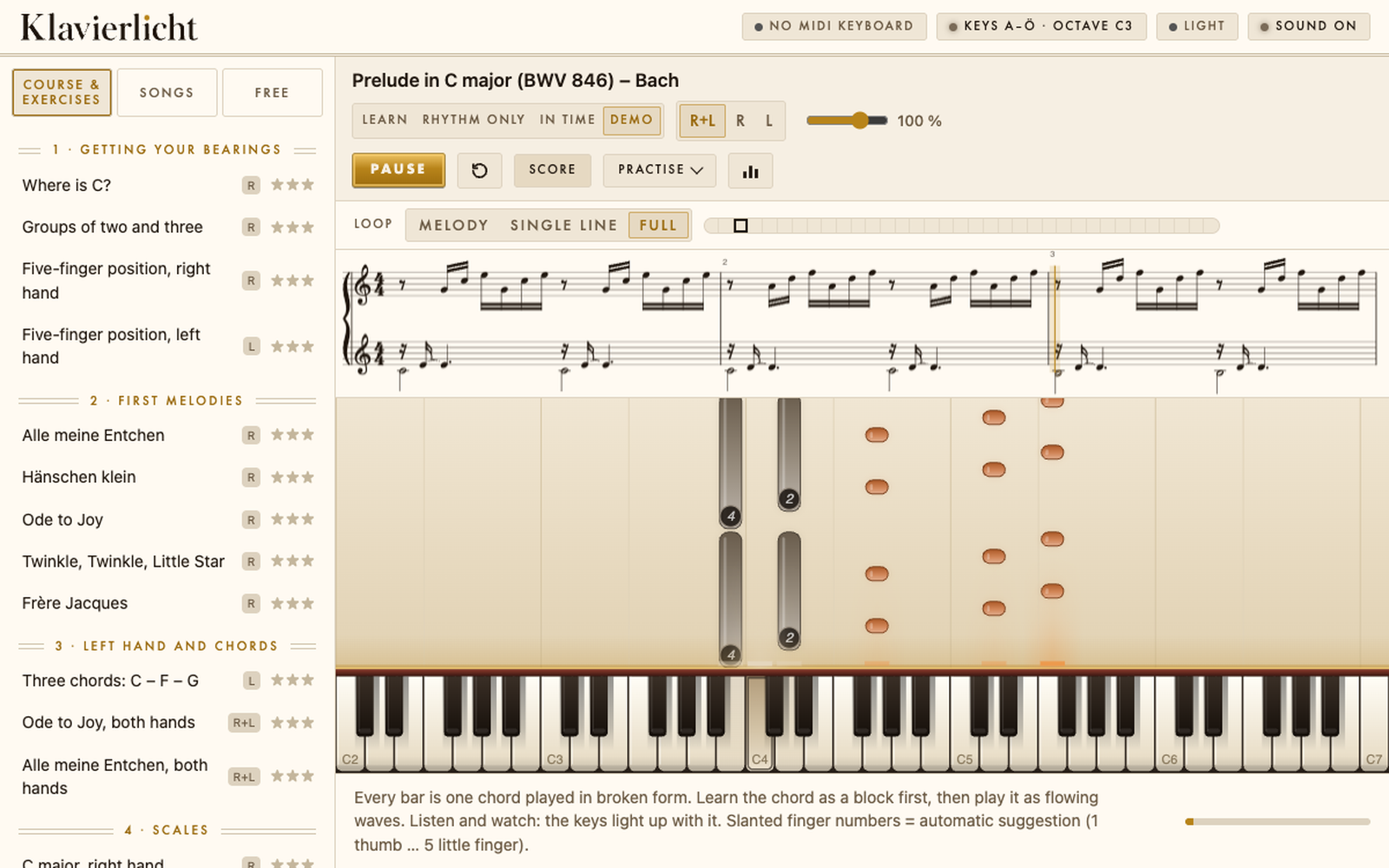
Both apps show the notes as falling bars above a keyboard. Both are played with a MIDI keyboard, both load your own pieces as MIDI and MusicXML, and with both you pay once instead of every month. The basic practice tools are similar too: play slower, practise one hand, repeat a passage.
Where Synthesia is strong
Synthesia has been around for many years and runs on more devices: Windows, Mac, iPad and Android. Klavierlicht runs on Apple devices only. According to its own website, Synthesia ships with 150 songs and supports MIDI and MusicXML files. If you are already settled with Synthesia and happy with it, there is no reason to switch.
Where Klavierlicht goes a different way
Klavierlicht is less a note player than a practice tool. It remembers where you struggle and builds the practice around that.
- Weak-bar detection: Klavierlicht finds the bars where you miss notes or hesitate and practises exactly those with you, instead of playing the whole piece from the top again.
- Tempo staircase: the tempo rises by itself once a run was clean, up to the target tempo.
- Hand ladder: right hand first, then left, then both, each with the tempo staircase.
- History per bar in milliseconds: week by week you see where you come in early or late, for every single bar.
- Fingering suggestion: if you load your own piece without fingering, Klavierlicht suggests one.
- Steps: pieces with several voices can be practised in steps: melody only, melody and bass, both hands in single lines, whole piece. Single-voice pieces do not need this.
A few more things that are not part of the comparison but belong to everyday use:
- Ear training: play back an echo, recognise intervals, tell chords apart, in five levels.
- Microphone (beta): for an acoustic piano the microphone listens along. It is most accurate with single notes and less so with chords. Analysis runs on the device. Klavierlicht is most reliable with a MIDI keyboard.
- Four languages: German, English, French and Italian.
- Computer keyboard: to try it out, your device's keyboard is enough; you do not need a piano keyboard yet.
- No account, no ads: your music, history and settings stay on your device. The exception is the optional AI tips: only if you explicitly agree does a practice report go to a Klavierlicht server, which passes it on to an AI provider in the USA. You see exactly what would be sent first.
What Klavierlicht does not have
An honest comparison includes this:
- No licensed pop songs. The course consists of folk songs and public-domain classical music, from a few notes with one hand up to both hands. If you want to learn a particular current song, you have to bring it as your own MIDI or MusicXML file.
- No video courses. Klavierlicht does not walk you through the basics with a teacher on video. It assumes you have a keyboard and the will to practise in a targeted way.
- Staff notation is an extra. With MusicXML it appears beside the falling notes exactly as in the file. With MIDI it appears only when the file is cleanly set to the bar, and then as a derived reading aid, not original notation. Freely played MIDI files get none; the app says why. Klavierlicht is not notation software.
- Apple only. Available for iPad and in the Mac App Store. There is nothing for Windows or Android.
- The microphone is a beta and not yet as mature as the keyboard detection.
Who each one suits
Synthesia suits you if you use many devices, including Windows and Android, want a large song selection, or simply want a proven tool for playing along. Klavierlicht suits you if you have a MIDI keyboard or a piano, work on individual pieces, and want an app that shows which bars do not sit yet and takes you further there in a targeted way. And if privacy matters to you: Klavierlicht needs no account and keeps music and history on the device. Anyone who switches on the optional AI tips sends practice figures to an AI provider.
If you mainly want to play well-known pop songs or like guided video lessons, Klavierlicht is the wrong place. One of the big subscription apps will suit you better.
Try it yourself
The app is free to download. The trial contains one course piece, one piece of your own choice (the choice is final), the first three pieces of "Klassik · Einstieg", three workshop exercises and the first ear-training level. If you like it, you unlock everything with a single in-app purchase: CHF 6 for iPad, or CHF 29 for iPad and Mac (US App Store: $6.99 and $34.99). No subscription, no expiry date.
On price, as of 17 November 2026: Synthesia costs $7.99 on the iPad App Store, Klavierlicht $6.99, so slightly less. For several devices Synthesia sells a key on its website, regularly $39 (currently $29 in a holiday sale); Klavierlicht for iPad and Mac costs $34.99 (CHF 29). While the sale lasts Synthesia is cheaper at $29; at the regular $39, Klavierlicht is somewhat cheaper. Prices change, so check at the time of purchase. For how this compares with subscription apps, see the price table on the home page. One more difference: Klavierlicht has an optional AI analysis that tells you what to practise (3 free trials, 100 analyses in every purchase).
Get it on the App StoreOn content: Klavierlicht includes 222 public-domain pieces; you can load your own MIDI and MusicXML files, and one piece of your own stays free permanently. I built Klavierlicht with the help of AI.
Frequently asked questions
Is Klavierlicht a Synthesia alternative for iPad?
Yes, if you practise with a MIDI keyboard: both show falling notes and are bought once. Klavierlicht costs CHF 6 for iPad or CHF 29 for iPad and Mac and runs on Apple devices only; Synthesia also runs on Windows and Android.
Can I practise my own pieces with Klavierlicht?
Yes. You can load your own MIDI and MusicXML files, and one stays free permanently. There are also 222 public-domain pieces.
What does Klavierlicht do that Synthesia does not?
Klavierlicht finds your weak bars, practises only those with a tempo ladder and a hands ladder, and shows your progress per bar. In return it has no licensed pop songs and only Apple platforms.
Do I need an account, and where does my data go?
No account, no ads; scores, history and settings stay on your device. Only the optional AI tips send a practice report to an AI provider in the USA, and only with your consent.
Does it work with an acoustic piano?
Yes, through the microphone, which is still a beta. Klavierlicht is most reliable with a MIDI keyboard.
Keep reading: Simply Piano alternative without a subscription · flowkey alternative with your own MIDI keyboard · Skoove alternative without a subscription · Learning piano as an adult · Practising piano with a MIDI keyboard · Connecting a MIDI keyboard to iPad and Mac · Public-domain piano pieces for beginners