 Klavierlicht
Learning piano as an adult: an app without a subscription and three practice tips
Learning piano as an adult is not a question of age but of time and method. This article gives three practice tips you can use with any app or without one, and says honestly when an app without a subscription is enough and when a guided course or a teacher is better. I build Klavierlicht, so read it with that in mind.
Three practice tips that work with any app
1. Isolate weak bars
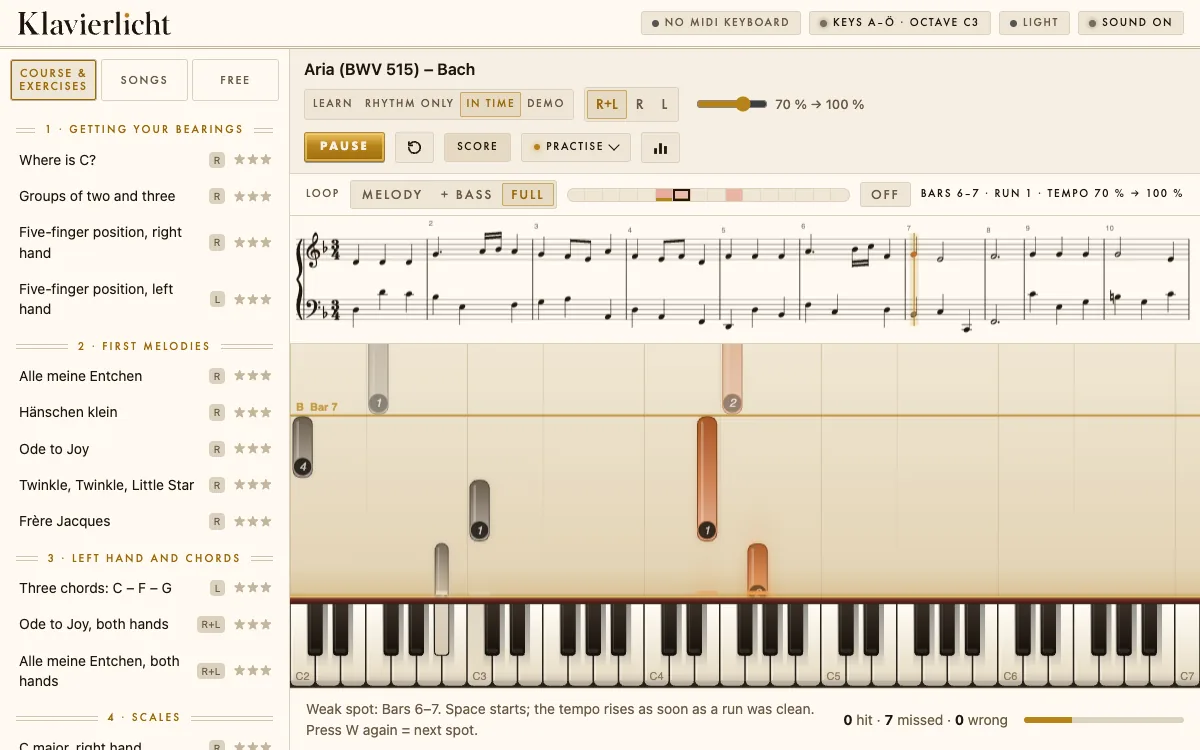
Most people play a piece from the top again and again and keep snagging on the same two or three places. Practice then becomes mostly repetition of what already works. Better: mark the bars where you stumble and practise only those, with a bar or two of run-up before and after. Once the spot works, play it in context again.
2. Step the tempo
Start slowly enough to play the spot cleanly. Raise the tempo only after a flawless run, and go in small steps up to the target tempo. If it gets bumpy at a step, go back one step. It feels slower but is faster, because you do not rehearse mistakes.
3. Practise hands separately
First play only the right hand, then only the left, then both together, again at a slow tempo and in steps. For difficult places this almost always pays off: each hand alone shows whether the problem is in the fingers or in the coordination.
How Klavierlicht helps
Klavierlicht turns these three tips into a routine. With a MIDI keyboard (the precise way) the app notices which bars you miss or hesitate in and practises them in a targeted way. The tempo staircase raises the tempo by itself after every clean run, and the hand ladder leads from the right hand through the left to both. You can load your own MIDI and MusicXML pieces (one stays free permanently), and 222 public-domain classical pieces are included. It costs CHF 6 once for iPad or CHF 29 for iPad and Mac, with no subscription, account or ads. Your data stays on the device; only the optional AI tips send a practice report to an AI provider in the USA, after your explicit consent.
When Klavierlicht is not the right choice
- You are starting from zero and do not know how to read notes or hold your hands: a guided course or a teacher helps more. Klavierlicht does not teach and has no video courses.
- You want to play well-known pop songs: Klavierlicht has no licensed songs; you would have to bring them as your own file.
- You need Android or Windows: Klavierlicht exists only for iPad and Mac.
- You have no keyboard: to try it out, your device keyboard is enough; for an acoustic piano there is a microphone mode, which is still a beta.
Which app for whom
Guided apps with lessons and well-known songs have their strengths, and the subscription pays for that guidance. How the individual offers differ is covered in the comparisons: Simply Piano, flowkey, Skoove and Synthesia. A sensible route is to start with a guided offer and add a practice tool such as Klavierlicht for your own pieces.
Frequently asked questions
Can I still learn piano as an adult?
Yes. What matters is regular, short practice and a method that focuses on the weak spots, not age.
Is an app without a subscription enough to learn piano?
For practising pieces in a targeted way, yes. If you are starting from scratch and need guidance, a guided course or a teacher serves you better.
How often should I practise?
There is no fixed number. Short, regular sessions usually help more than rare long ones. Klavierlicht suggests a daily plan.
Do I need a keyboard?
Klavierlicht is most accurate with a MIDI keyboard. To try it out, your device keyboard is enough.
Try it yourself
The app is free to download. The trial contains one course piece, one piece of your own choice, the first three pieces of "Klassik · Einstieg", three workshop exercises and the first ear-training level. After that you unlock everything with a single purchase: CHF 6 for iPad or CHF 29 for iPad and Mac. No subscription.
Get it on the App StoreKeep reading: Synthesia alternative for iPad · Simply Piano alternative without a subscription · flowkey alternative with your own MIDI keyboard · Skoove alternative without a subscription · Practising piano with a MIDI keyboard · Connecting a MIDI keyboard to iPad and Mac · Public-domain piano pieces for beginners