 Klavierlicht
flowkey alternative with your own MIDI keyboard: Klavierlicht compared
flowkey is one of the best-known piano apps in German-speaking countries: many pieces, video lessons, a teacher whose hands play along. Klavierlicht is aimed at a different situation: you have a MIDI keyboard, play your own pieces and want to practise exactly the places that do not sit yet, without a subscription. This article shows the differences and says when flowkey is the better fit. I build Klavierlicht, so read the comparison with that in mind.
Where flowkey is strong
According to its store listing, flowkey offers over 1,000 pieces, lessons with played-along hands and a score that you follow bar by bar (as of 7 November 2026). It has a wait mode, a loop, adjustable tempo and practising one hand alone. The app recognises your playing through the microphone or a MIDI keyboard, runs on iOS, Android and the web, and is available in 11 languages. In the German App Store it has over 25,000 ratings at 4.64 stars. flowkey is especially strong for adult beginners and returners who like to learn by example and play well-known songs; according to the provider, the "Premium" plan adds pop and film.
If you want a guided learning journey with videos and a large song selection, flowkey is the better choice. Klavierlicht is not a teacher.
Where Klavierlicht is different
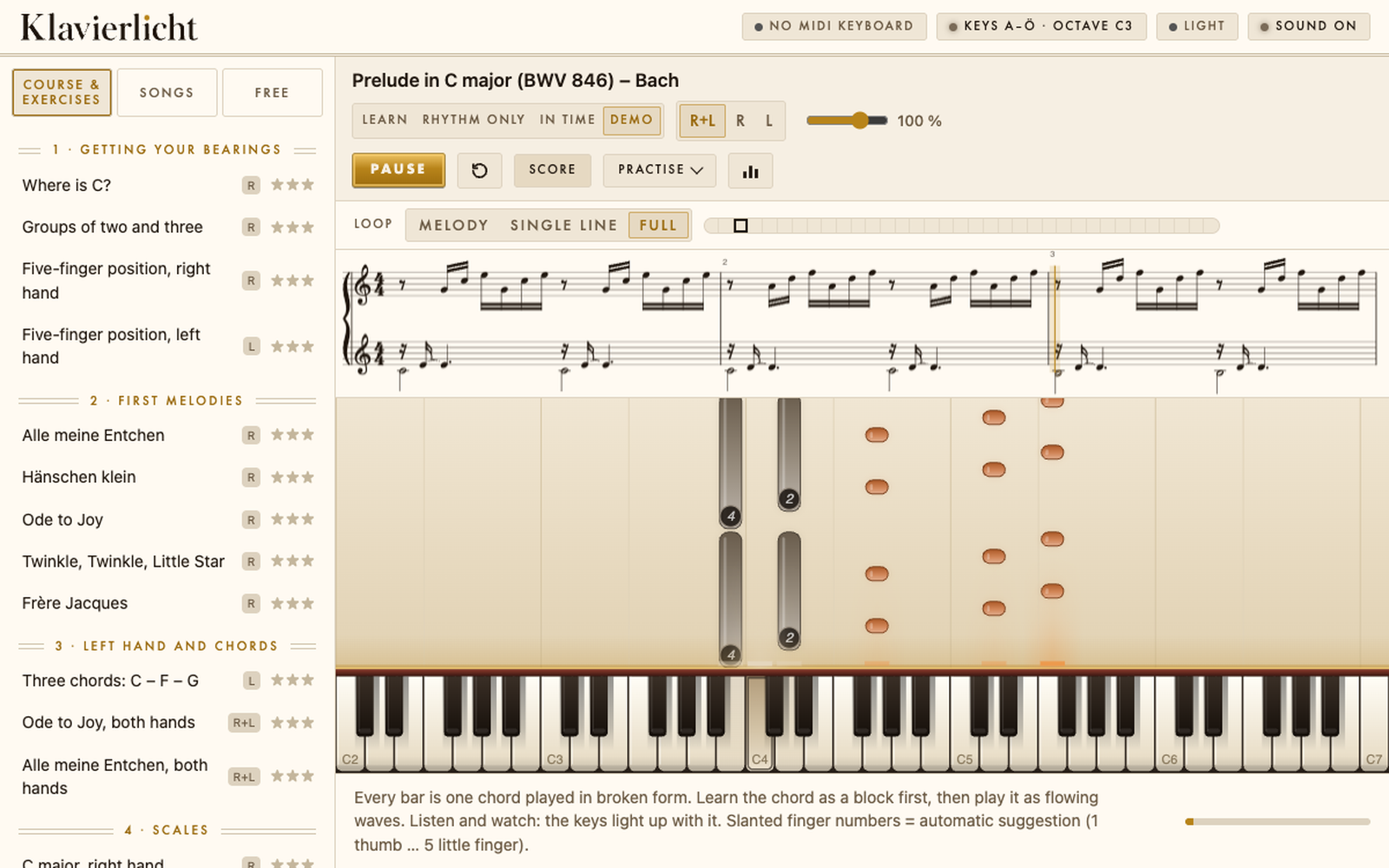
Klavierlicht works best with a MIDI keyboard, which is the precise way to use it. The focus is on practising:
- Finds weak bars. Klavierlicht notices where you miss notes or hesitate and practises exactly those bars with you.
- Tempo staircase. The tempo rises by itself once a run was clean, up to the target tempo.
- Hand ladder. Right hand first, then left, then both.
- Your own pieces. MIDI and MusicXML files can be loaded, and one stays free permanently. I found no import of your own files in flowkey's store listing.
- 222 public-domain classical pieces are included.
- Pay once. CHF 6 for iPad or CHF 29 for iPad and Mac. No subscription, no account, no ads.
- Data stays on your device. Only the optional AI tips send a practice report, after your explicit consent, to a Klavierlicht server, which passes it on to an AI provider in the USA.
- iPad and Mac in one purchase if you choose "iPad and Mac".
What Klavierlicht does not have
- No licensed songs. Public-domain classical music, folk songs and whatever you bring yourself.
- No video lessons and no teacher's hands. Klavierlicht assumes you can already play and want to practise in a targeted way.
- Apple only: iPad and Mac, no Android, no web.
- The microphone is a beta. It is most accurate with single notes and less so with chords.
The comparison at a glance
As of November 2026.
| flowkey | Klavierlicht | |
|---|---|---|
| Pricing model | subscription, no lifetime plan | one-time, no subscription |
| Price (Swiss App Store) | from CHF 120 per year | CHF 6 (iPad) or CHF 29 (iPad and Mac), one-time |
| Songs | over 1,000, pop and film in the larger plan | 222 public-domain classical pieces and a small course |
| Video lessons | yes | no |
| Your own MIDI/MusicXML pieces | not shown in the store listing | yes, one permanently free |
| Finds weak bars and drills them | wait mode, loop, tempo; weak-bar detection not shown | yes, with tempo staircase and hand ladder |
| MIDI keyboard | yes | yes, the precise way |
| Microphone | yes | beta |
| Devices | iOS, Android, web | iPad, Mac |
| Account and ads | - | no account, no ads |
Sources: Swiss App Store listings and the flowkey help page, as of November 2026. Prices come from the in-app purchases, which do not always state the term; they can differ by country and promotion. A "-" means: not checked. Check at the time of purchase.
Who each one suits
flowkey suits you if you want a guided learning journey, like playing well-known songs and enjoy video lessons. The subscription pays for the library and the guidance.
Klavierlicht suits you if you have a MIDI keyboard, play your own or classical pieces and want an app that shows which bars do not sit yet and brings them up to tempo. You can also combine them: flowkey for learning new songs, Klavierlicht for polishing your own pieces.
Frequently asked questions
What is a flowkey alternative without a subscription?
You unlock Klavierlicht once: CHF 6 for iPad or CHF 29 for iPad and Mac, with no subscription, account or ads. In return it has no video lessons and no licensed songs.
Can I practise my own pieces with Klavierlicht?
Yes. You can load your own MIDI and MusicXML files, and one stays free permanently. There are also 222 public-domain classical pieces.
Does Klavierlicht work with my MIDI keyboard?
Yes, over USB or Bluetooth. That is the precise way. For an acoustic piano there is a microphone mode, which is still a beta.
How does it practise the weak bars?
Klavierlicht finds the bars where you miss notes and practises only those. The tempo rises after each clean run, if needed first with one hand, then the other, then both.
Try it yourself
The app is free to download. The trial contains one course piece, one piece of your own choice, the first three pieces of "Klassik · Einstieg", three workshop exercises and the first ear-training level. If you like it, you unlock everything with a single purchase: CHF 6 for iPad or CHF 29 for iPad and Mac. No subscription.
Get it on the App StoreKeep reading: Synthesia alternative for iPad · Simply Piano alternative without a subscription · Skoove alternative without a subscription · Learning piano as an adult · Practising piano with a MIDI keyboard · Connecting a MIDI keyboard to iPad and Mac · Public-domain piano pieces for beginners